
Hepsia Email Manager
Hepsia's Email Manager is an all-inclusive e-mail management solution, which will grant you absolute authority over your e-mail boxes and e-newsletters. With this easy-to-navigate GUI, you can create a new e-mail account in an instant and administer its settings easily. What's more, you can forward email messages from one email account to another, create e-mail filters, set up autoresponders and defend your email accounts against junk electronic mail messages.

Anti-Spam Protection
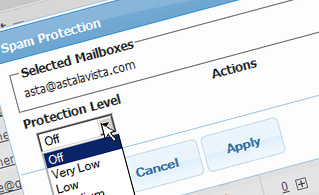
We have server-side anti-spam filtering software, so you can defend all your e-mail accounts against spam e-mail messages. You can also change the level of anti-spam protection from 'Very Low' to 'Very High' to make sure that no unwanted email messages will find their way into your e-mail box. Your e-mail messages will be sifted out based on their spam score. You can also choose whether an email message marked as spam should be deleted or forwarded to a given e-mail account.
Email Filters
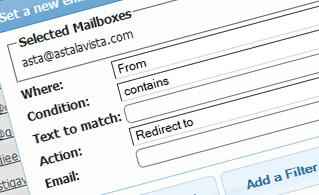
Mail filters are ideal for filtering your incoming electronic mails according to specific rules defined by you. Setting up email filters is very easy - all you need to do is fill out a simple form and your email filter will be activated and will go into effect immediately. You can easily create a filter for any of your email box accounts and select the filtering criteria according to your desire.
Email Forwarding
You can easily redirect your incoming electronic mail messages from one e-mailbox account to another, or even to several other e-mailboxes. Simply specify the email mailbox account you wish to redirect e-mails from, then select the destination email box and indicate if you would like to keep a copy on our servers.

Auto-Configuration Options
With the Email Manager GUI, you can easily set up the mail client of your preference to access your email mailboxes. Simply browse to the Auto-Config column next to the mailbox account you want to set up on your computer or mobile device and click on the e-mail client that you wish to use (Microsoft Outlook, Outlook Express, Mozilla Thunderbird or Apple Mail). Then a file will be generated for you. Drag the file to your mail client and the new e-mail box will be set up in a minute.
More Features
With the Email Manager interface, working with multiple email boxes at the same time is a breeze. The Email Manager graphical user interface will also allow you to quickly create an auto-reply message - enter the message you would like people to notice and our system will do the rest. And if you wish to configure a catch-all email box - you can achieve that with a simple click on the Catch-all icon.
| SHARED HOSTING | KVM VPS | OPENVZ VPS | SEMI-DEDICATED PLANS | DEDICATED SERVERS |
| Unlimited storage | 80 GB storage | 80 GB storage | Unlimited storage | 480 GB storage |
| Unlimited bandwidth | 4 TB bandwidth | 3 TB bandwidth | Unlimited bandwidth | 10 TB bandwidth |
| 1 website hosted | Unlimited websites hosted | Unlimited websites hosted | Unlimited websites hosted | Unlimited websites hosted |
| 30-Day Free Trial | 24/7/365 support | 24/7/365 support | 30-Day Free Trial | 24/7/365 support |
| start from $3.00/mo | start from $14.50/mo | start from $14.50/mo | start from $20.00/mo | start from $54.00/mo |